 tophhie.cloud
Cloudflare Zero Trust – Blocked Request Page#
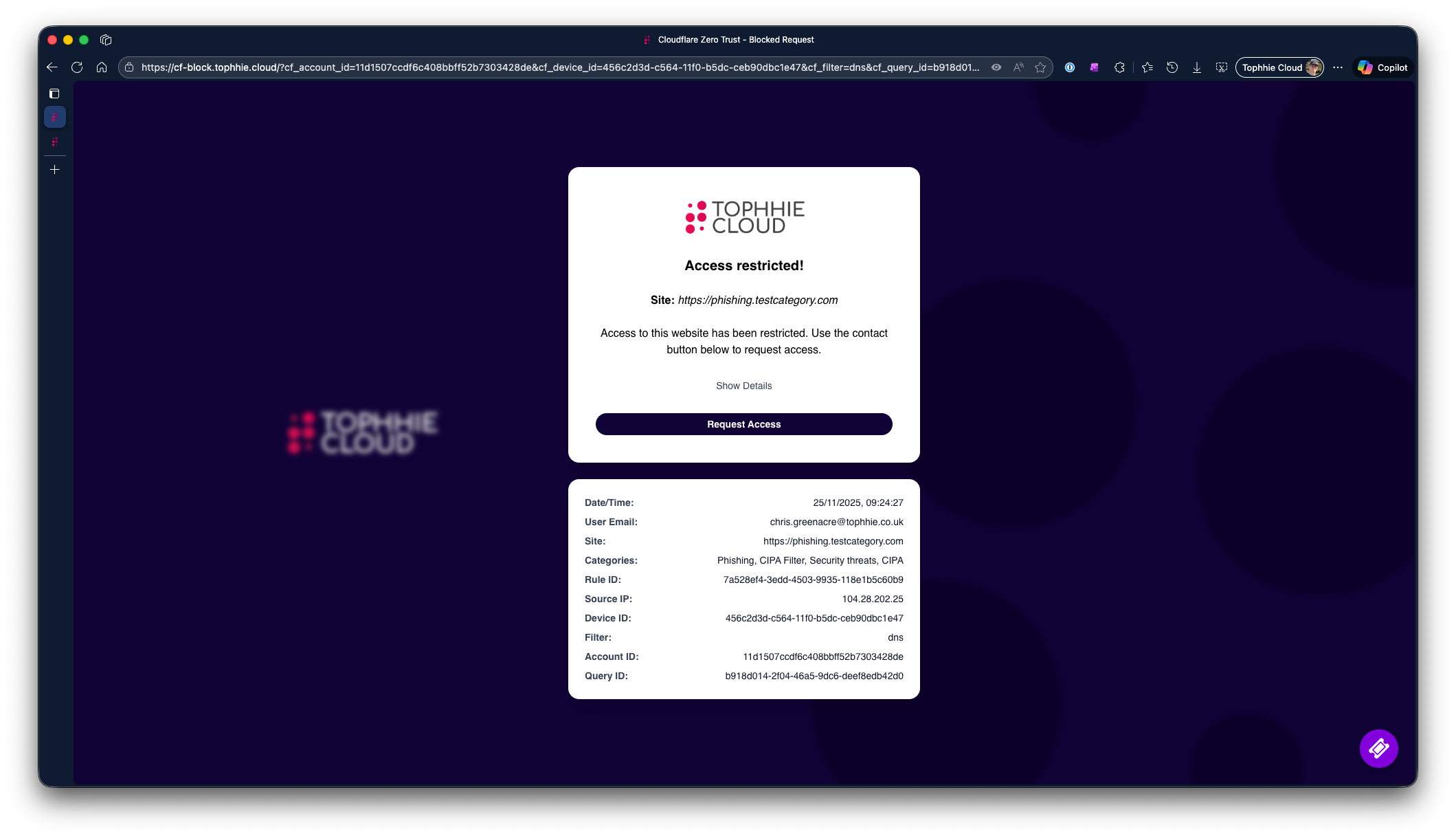
A simple SvelteKit application that displays a branded "Access Restricted" page when a request is blocked by Cloudflare Zero Trust. It provides users with contextual details about the blocked request and options to contact support.
✨ Features#
-
Dynamic Request Details
Automatically extracts Cloudflare query parameters (e.g.,cf_user_email,cf_site_uri,cf_rule_id) and displays them in a clean UI. -
Responsive Design
Built with TailwindCSS for mobile-first responsiveness. -
Support Actions
- Request Access: Generates a
mailto:link with all request details. - Support Website: Floating button linking to your support portal.
- Request Access: Generates a
-
Animated UI
Smooth slide transition for additional details using Svelte’s built-in transitions.
📂 Project Structure#
src/
├── routes/
│   └── +page.svelte    # Main UI for blocked request page
├── config.ts           # Contact email and support URL configuration
⚙️ Configuration#
Edit config.ts to set your support details and required blocked text:
export class Config {
    static readonly CONTACT_EMAIL: string = "help@tophhie.cloud";
    static readonly CONTACT_WEB: string = "https://support.tophhie.cloud";
    static readonly BLOCKED_HEADER: string = "Access restricted!";
    static readonly BLOCKED_TEXT: string = "Access to this website is restricted. Use the contact button below to request access.";
    static readonly BLOCKED_TEXT_NOMETA: string = "Access to this website is restricted."
    static readonly CONTACT_BUTTON_TXT: string = "Request access";
}
🚀 Getting Started#
1. Clone the repository#
git clone https://github.com/tophhie/cf-zero-trust-blockpage.git
cd cf-zero-trust-blockpage
2. Install dependencies#
npm install
3. Run the development server#
npm run dev
4. Build for production#
npm run build
🔑 Environment Variables (Optional)#
If you prefer dynamic configuration, you can replace Config.ts with environment variables:
VITE_CONTACT_EMAIL=help@tophhie.cloud
VITE_CONTACT_WEB=https://support.tophhie.cloud
VITE_BLOCKED_HEADER=Access restricted!
VITE_BLOCKED_TEXT=Access to this website is restricted. Use the contact button below to request access.
VITE_BLOCKED_TEXT_NOMETA=Access to this website is restricted.
VITE_CONTACT_BUTTON_TXT=Request access
🖼️ UI Preview#
- Main Page:
Displays logo, blocked message, and action buttons. - Details Panel:
Slides open to show request metadata (IP, rule ID, device ID, etc.).
🛠️ Tech Stack#
✅ Example Query Parameters#
The page reads Cloudflare query params like:
cf_user_email
cf_site_uri
cf_request_category_names
cf_rule_id
cf_source_ip
cf_device_id
cf_application_name
cf_filter
cf_account_id
cf_query_id
cf_connection_id
cf_request_id
📬 Contact#
For support, email help@tophhie.cloud.
✅ Future Enhancements#
- Add fade + slide combo for details panel.
- Support multi-language UI.