 dunkirk.sh
my own indieAuth provider!
indiko.dunkirk.sh/docs
indieauth
oauth2-server
1# Indiko
2
3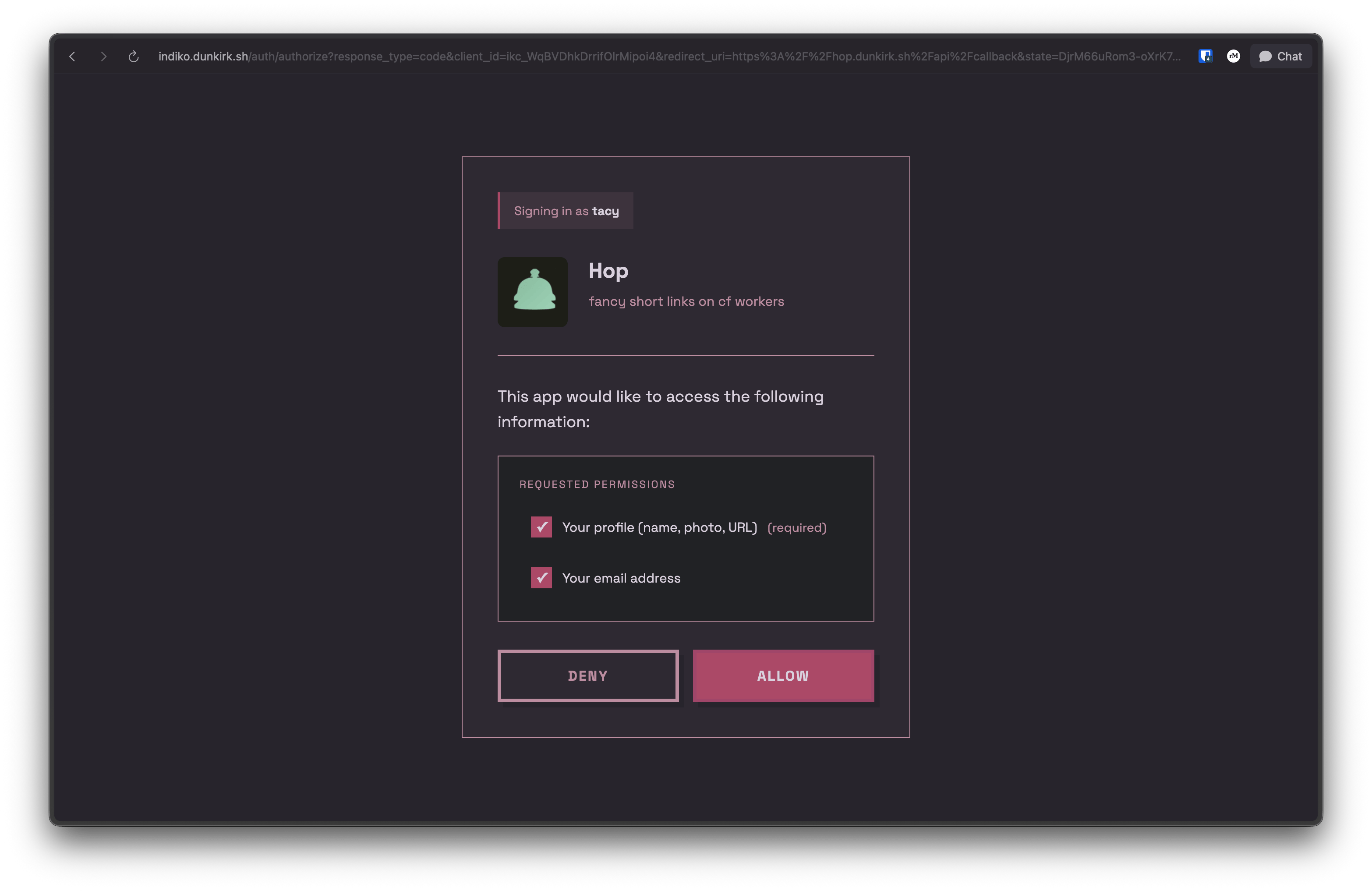
4
5No that was not a typo the project's name actually is `indiko`! This is a small implementation of [IndieAuth](https://indieweb.org/How_to_set_up_web_sign-in_on_your_own_domain) running on bun with sqlite and serving as the authentication provider for my homelab / side projects it also supports custom clients with roles over the OAuth 2.0 spec.
6
7The canonical repo for this is hosted on tangled over at [`dunkirk.sh/indiko`](https://tangled.org/@dunkirk.sh/indiko)
8
9## Quick Start
10
11### Prerequisites
12
13- [Bun](https://bun.sh) v1.0 or higher
14- A domain with HTTPS (required for WebAuthn)
15
16### Installation
17
181. Clone the repository:
19
20```bash
21git clone https://github.com/taciturnaxolotl/indiko.git
22cd indiko
23```
24
252. Install dependencies:
26
27```bash
28bun install
29```
30
313. Create a `.env` file:
32
33```bash
34cp .env.example .env
35```
36
37Configure the following environment variables:
38
39```env
40ORIGIN=https://your-indiko-domain.com
41RP_ID=your-indiko-domain.com
42PORT=3000
43NODE_ENV=production
44```
45
46- `ORIGIN` - Full URL where Indiko is hosted (must match RP_ID)
47- `RP_ID` - Domain for WebAuthn (no protocol, matches ORIGIN domain)
48- `PORT` - Port to run the server on
49- `NODE_ENV` - Environment (dev/production)
50
51The database will be automatically created at `./indiko.db` on first run.
52
534. Start the server:
54
55```bash
56# Development (with hot reload)
57bun run dev
58
59# Production
60bun run start
61```
62
63### First User Setup
64
65On first run, you'll need to create an admin user:
66
671. Visit `https://your-indiko-domain.com/login`
682. Register with a passkey
693. This first user will automatically be an admin
70
71After the first user is created, the bootstrap invite is disabled. Subsequent users must be invited by an admin.
72
73## Usage
74
75### Client Types
76
77Indiko supports two types of OAuth clients:
78
79#### Auto-registered Clients (IndieAuth)
80
81Any app can use Indiko without admin approval. On first authorization:
82- Use any valid URL as your `client_id` (e.g., `https://myapp.example.com`)
83- Indiko fetches metadata from your `client_id` URL
84- App is automatically registered
85- **MUST use PKCE** (code_verifier) for security
86- **No client secret** (public client)
87- Cannot use role-based access control
88
89This is perfect for IndieAuth-compatible apps and personal projects.
90
91#### Pre-registered Clients (OAuth 2.0 with Secrets)
92
93For apps requiring client secrets or role-based access control, admins can pre-register clients:
94
951. Go to `/admin/clients`
962. Click "Create OAuth Client"
973. Fill in:
98 - **Name** - Display name for your app
99 - **Logo URL** - (Optional) URL to app logo
100 - **Description** - (Optional) Brief description
101 - **Redirect URIs** - One or more OAuth callback URLs
102 - **Available Roles** - (Optional) Define roles users can be assigned
103 - **Default Role** - (Optional) Auto-assign this role on first auth
104
1054. Save and copy the generated credentials:
106 - **Client ID** - Format: `ikc_xxxxxxxxxxxxxxxxxxxxx`
107 - **Client Secret** - Format: `iks_xxxxxxxxxxxxxxxxxxxxxxxxxxxxxxxxxxxxxxxxxxx`
108
109 > [!IMPORTANT]
110 > The client secret is only shown once! Save it securely.
111
112**Pre-registered clients:**
113- **MUST use both PKCE and client_secret** in token requests
114- Support role assignment for RBAC (Role-Based Access Control)
115- Admin-managed metadata and permissions
116- Generated client ID format: `ikc_` prefix
117
118### Using as an IndieAuth Provider
119
120Add these tags to your website's `<head>`:
121
122```html
123<link
124 rel="authorization_endpoint"
125 href="https://your-indiko-domain.com/auth/authorize"
126/>
127<link rel="token_endpoint" href="https://your-indiko-domain.com/auth/token" />
128<link rel="me" href="https://your-indiko-domain.com/u/your-username" />
129```
130
131Now you can sign in to IndieAuth-compatible sites using `https://your-domain.com/` as your identity.
132
133### Using as an OpenID Connect (OIDC) Provider
134
135Indiko also supports OpenID Connect (OIDC) for modern authentication flows:
136
137**Discovery endpoint:**
138```
139https://your-indiko-domain.com/.well-known/openid-configuration
140```
141
142**Key features:**
143- Authorization Code Flow with PKCE
144- ID Token with RS256 signing
145- JWKS endpoint for token verification
146- Support for `openid`, `profile`, and `email` scopes
147- Userinfo endpoint for retrieving user claims
148
149Test your OIDC setup using the [OIDC Debugger](https://oidcdebugger.com/).
150
151## API Reference
152
153### OAuth 2.0 / OpenID Connect Endpoints
154
155- `GET /auth/authorize` - Authorization endpoint (OAuth 2.0 / OIDC)
156- `POST /auth/token` - Token exchange endpoint (returns access token and ID token for OIDC)
157- `GET /userinfo` - OIDC userinfo endpoint (returns user claims)
158- `GET /.well-known/openid-configuration` - OIDC discovery document
159- `GET /jwks` - JSON Web Key Set for ID token verification
160- `POST /auth/logout` - Session logout
161
162### User Profile
163
164- `GET /u/:username` - Public h-card profile
165
166### Admin API (requires admin token)
167
168- `GET /api/admin/users` - List all users
169- `POST /api/admin/invites` - Create invite
170- `GET /api/admin/invites` - List invites
171- `GET /api/admin/clients` - List OAuth clients
172- `POST /api/admin/clients` - Create OAuth client
173- `GET /api/admin/clients/:clientId` - Get client details
174- `PUT /api/admin/clients/:clientId` - Update client
175- `DELETE /api/admin/clients/:clientId` - Delete client
176
177## Production Deployment
178
179### Reverse Proxy Configuration
180
181Indiko should be deployed behind a reverse proxy (nginx, Caddy, Traefik) for production use. The proxy should add security headers.
182
183#### nginx Example
184
185```nginx
186server {
187 listen 443 ssl http2;
188 server_name auth.example.com;
189
190 ssl_certificate /path/to/cert.pem;
191 ssl_certificate_key /path/to/key.pem;
192
193 # Security headers
194 add_header X-Frame-Options "DENY" always;
195 add_header X-Content-Type-Options "nosniff" always;
196 add_header X-XSS-Protection "1; mode=block" always;
197 add_header Referrer-Policy "strict-origin-when-cross-origin" always;
198 add_header Permissions-Policy "geolocation=(), microphone=(), camera=()" always;
199 add_header Strict-Transport-Security "max-age=31536000; includeSubDomains; preload" always;
200
201 # Content Security Policy
202 add_header Content-Security-Policy "default-src 'self'; style-src 'self' 'unsafe-inline' https://fonts.googleapis.com; font-src 'self' https://fonts.gstatic.com; img-src 'self' data: https:; script-src 'self'; connect-src 'self'; frame-ancestors 'none'; base-uri 'self'; form-action 'self';" always;
203
204 location / {
205 proxy_pass http://localhost:3000;
206 proxy_set_header Host $host;
207 proxy_set_header X-Real-IP $remote_addr;
208 proxy_set_header X-Forwarded-For $proxy_add_x_forwarded_for;
209 proxy_set_header X-Forwarded-Proto $scheme;
210 }
211}
212```
213
214#### Caddy Example
215
216```caddy
217auth.example.com {
218 reverse_proxy localhost:3000
219
220 header {
221 X-Frame-Options "DENY"
222 X-Content-Type-Options "nosniff"
223 X-XSS-Protection "1; mode=block"
224 Referrer-Policy "strict-origin-when-cross-origin"
225 Permissions-Policy "geolocation=(), microphone=(), camera=()"
226 Strict-Transport-Security "max-age=31536000; includeSubDomains; preload"
227 Content-Security-Policy "default-src 'self'; style-src 'self' 'unsafe-inline' https://fonts.googleapis.com; font-src 'self' https://fonts.gstatic.com; img-src 'self' data: https:; script-src 'self'; connect-src 'self'; frame-ancestors 'none'; base-uri 'self'; form-action 'self';"
228 }
229}
230```
231
232### Security Headers Explained
233
234- **X-Frame-Options**: Prevents clickjacking attacks
235- **X-Content-Type-Options**: Prevents MIME-sniffing
236- **X-XSS-Protection**: Enables browser XSS filter
237- **Referrer-Policy**: Controls referrer information
238- **Permissions-Policy**: Restricts browser features
239- **Strict-Transport-Security**: Enforces HTTPS
240- **Content-Security-Policy**: Prevents XSS and data injection attacks
241
242> [!NOTE]
243> The CSP allows Google Fonts and user-provided profile images (`img-src https:`). Adjust based on your security requirements.
244
245## Development
246
247```bash
248# Run with hot reload
249bun run dev
250
251# Format code
252bun run format
253
254# Type check (handled by Bun)
255bun run src/index.ts
256```
257
258<p align="center">
259 <img src="https://raw.githubusercontent.com/taciturnaxolotl/carriage/main/.github/images/line-break.svg" />
260</p>
261
262<p align="center">
263 <i><code>© 2025-present <a href="https://dunkirk.sh">Kieran Klukas</a></code></i>
264</p>
265
266<p align="center">
267 <a href="https://tangled.org/dunkirk.sh/indiko/blob/main/LICENSE.md"><img src="https://img.shields.io/static/v1.svg?style=for-the-badge&label=License&message=O'Saasy&logoColor=d9e0ee&colorA=363a4f&colorB=b7bdf8"/></a>
268</p>